Most online proofing platforms struggle to accurately render PDF colors, transparency, and fonts. This leads to wasted review rounds and costly print errors. We tested Ziflow against other vendors using industry-standard benchmarks (the Ghent Output Suite and ECI Altona Test Suite), and the results reveal significant gaps in how different platforms process PDF files. If your marketing team proofs PDFs at scale, the underlying processing technology matters more than you might think.Despite the diversification of campaign media types, one file type still reigns supreme in creative review and approval: PDFs.
Online proofing has come a long way in the 18 years since Mat Atkinson, Ziflow's co-founder, and I launched ProofHQ back in 2008 and then Ziflow in 2017. Initially, ProofHQ only supported a handful of static file types. Ziflow now supports the review and approval of over 1,200 media and file types, including static designs and documents (PDF, images, Word, etc.), audio, video, websites, and rich media packages like banners and animated GIFs.
Even though Ziflow handles thousands of file types, PDF proofing constitutes over 50% of all review and approval activity for our users. PDF proofs are opened and reviewed millions of times every single month using our platform.
Ensuring that PDF files are loaded quickly and accurately in a reviewer's browser is of utmost importance to us.
What we'll cover
- What is PDF proofing
- Why is PDF proofing important?
- How Ziflow processes PDF files for speed and accuracy
- How we tested PDF processing across online proofing platforms
- Three PDF processing failures that delay approvals and trigger reprints
- How poor PDF color accuracy costs marketing teams time and money
- Comparing the results between online proofing vendors
- AI and automated PDF proofing
- Why your PDF proofing software's processing quality matters
- FAQ
What is PDF proofing
PDF proofing is the process of marking up an electronic file for updates and then approving it once it's ready for production or publication. It's a critical step in the creative workflow to avoid errors, ensure compliance, and guarantee design standards are met.
Creative and marketing teams use PDF proofing software for brochures, sales sheets, magazines, flyers, or any text and graphic heavy collateral that will be printed or distributed online. Multiple stakeholders often need to review and approve these digital assets before they go to print, making centralized collaboration features essential.
Why is PDF proofing important?
Because catching a mistake on screen costs you five minutes. Catching it after the asset ships (whether that’s a 50,000-unit print run or a sales deck already sitting in a prospect’s inbox) costs a lot more.
And remember, a PDF isn’t just a print file. In Ziflow, PDFs are one of over 1,200 supported file types, and they show up as everything from brochures and packaging headed to press to pitch decks, ebooks, reports, and design exports that will only ever exist on a screen. Whatever the destination, PDF proofing gives everyone involved (designers, printers, brand teams, legal and regulatory reviewers) one accurate file to look at. Here’s what that buys you:
- Catch errors before they get expensive. Typos, wrong pricing, outdated logos, incorrect overprint settings. Finding these during review prevents reprints, repackaging, re-sends, and calls to the client, whether the asset was headed to a press or an inbox.
- Keep everyone on the same file. When feedback lives on one centralized proof, you eliminate versioning issues.
- Get clearer, faster feedback. Pinned comments and markup on the exact element beat vague notes every time.
- Protect output quality, in print and on screen. An accurate proof lets reviewers judge color, transparency, and fonts as they’ll actually appear, so what ships matches what was approved. That matters just as much for a digital lookbook as it does for a press run.
- Create an approval record. Every comment, version, and decision is logged. When compliance asks who approved what and when, you have the receipts.
- Shorten review cycles. Structured proofing routes the file to the right people in the right order, so approvals stop stalling in someone’s inbox.
How Ziflow processes PDF files for speed and accuracy
The solution to delivering fast, accurate PDF proofing lies in the unique processing capability we’ve built into Ziflow. When you upload a PDF file to our platform, we convert it into a format that’s both accurate and very small in size, making it very quick to load for review and markup.
PDFs aren’t actually loaded in the user’s browser in Ziflow. We’ve developed Ziflow to deliver a proofing solution that can take extremely large PDF files and quickly render them in users’ browsers. Reviewers get the most accurate transparency, font rendering, text quality, and color reproduction, without waiting around for a giant file to load.
That processing engine powers every step of the review. Here’s what proofing a PDF inside Ziflow actually looks like, start to finish.
Step 1: Upload your PDF
Click Create Proof, then drag and drop your PDF (or browse for it). Ziflow immediately converts the file into that fast, accurate proof format. Multi-page documents process in parallel, so even a 200-page catalog is ready for review quickly.
Step 2: Add a brief
Give your reviewers context before they start clicking. The brief (a text note or attached file) appears at the top of the comment box in the Proof Viewer, so guidelines like "check pricing against the master sheet" are impossible to miss.
Step 3: Set up your workflow and reviewers
Add reviewers to Stage 1, or build a multi-stage workflow that routes the proof from creative to brand to legal in the right order. If your team reviews the same way every time, apply a workflow template and skip the setup entirely: stages, reviewers, and notifications are added automatically.
Step 4: Reviewers mark it up
Reviewers get an email, click Open Proof, and land in the Proof Viewer. From there they can pin comments to exact locations, draw markup with rectangles, arrows, and freehand tools, and annotate text directly: highlight, replace, delete, or insert. Every comment is tied to the precise spot it refers to, so "fix this" actually means something.
Step 5: Make a decision
Once reviewers finish, they make their call: Approved, Approved with changes, Changes required, and so on. When everyone in a stage has weighed in (or the one required decision comes through), Ziflow calculates the final status automatically and notifies the proof owner. No chasing.
Step 6: Version, compare, and finish
Changes required? Upload a new version; it inherits the previous version’s workflow and reviewers. Reviewers can compare versions side by side, down to the pixel, to confirm the fixes landed. When the proof hits Approved, you have a complete, time-stamped record of who signed off on what.
How we tested PDF processing across online proofing platforms
To understand just how important the underlying PDF processing is among PDF proofing options, we ran two tests that compare our capabilities to other online proofing environments.
We used two of the most common methods to test the full range of PDF processing capabilities:
- Ghent Output Suite: We used a test file from the Ghent Workgroup. The Ghent Output Suite was created to test the processing of PDF files in the graphic arts industry. These patches can be used by end users of graphic arts equipment as well as developers of applications that handle PDF files.
- European Color Initiative (ECI) Altona Test Suite 2: ECI launched a project called "Altona Test Suite 2" with the purpose of exercising features in the PDF language that have become relevant on the background of the publication of ISO 15930-7 (PDF/X-4). When processing a PDF file, applications need to ensure they handle all PDF capabilities. This makes the Altona Test Suite an excellent file for testing PDF review and approval capabilities.
Using these two tests, we did a comprehensive comparison to see how our PDF processing compares to other platforms and identify the most common pitfalls when working with PDF files in an online review environment.
Note: This article was originally published in July 2023; performance tests reflect data from that time.
Three PDF processing failures that delay approvals and trigger reprints
When we ran these tests, we found three common problems with PDF proofing across other online proofing vendors:
- Color accuracy: The most problematic issue we found is with color accuracy. Many systems can't reproduce the true fidelity of colors on a file when converted into a proof. Colors appear darker or lighter on screen, or color separation is inaccurate, making it almost impossible to truly check what a file will look like upon print.
- Load speeds: The loading of PDF proofs can take a very long time. This is because most systems download files in large file formats that are cumbersome to work with and force the user to wait for files to load before they can even begin working with a PDF proof. This delays the approval process and wastes time that marketing teams could spend on creative work.
- Upload speeds: We found considerable problems with upload speeds. Only two of the five vendors we tested use the same or similar upload technology as Ziflow. The rest use archaic solutions that meant upload times were more than 10x slower.
How poor PDF color accuracy costs marketing teams time and money
As we've seen working in online proofing for over 20 years, poor color reproduction, font pixelation, text quality, and other elements in PDF proofs can have major impacts on both the time and cost of review, approval, and printing.
I've personally seen hundreds of support tickets where we catch the incorrect use of overprint on a proof during the review process. Accurately identifying what a file looks like ultimately helps a client avoid an erroneous print run, often saving thousands of dollars in printing costs.
Being able to maintain PDF color and formatting accurately between the source file and the PDF proof saves creative and marketing teams countless hours during the review process.
I've encountered many instances where reviewers get into time-consuming back-and-forth comments about the colors displayed in a proof, only to discover that the original uploaded PDF file actually did show the correct color but the proof wasn't converted properly. Maintaining color accuracy on a PDF proof helps designers, creative teams, and their clients avoid these superfluous discussions around color variation and ultimately get PDFs approved and printed much faster.
Poor upload and load speeds simply delay the review and approval process. Waiting for a file to load in the browser is an unnecessary and completely avoidable delay. When a designer or creative worker sends a PDF file to a client for review, the reviewer shouldn't need to wait for the file to load to provide feedback and add comments.
That's why creating a solution that users (and their clients) can rely on for error-free and fast PDF processing is so important to us at Ziflow.
Comparing the results between online proofing vendors
Here's how Ziflow compares in our two real-world tests. The visual examples demonstrate just how much impact the difference in the underlying accuracy between proofing solutions can make when processing PDFs.
Ghent Output Suite test results
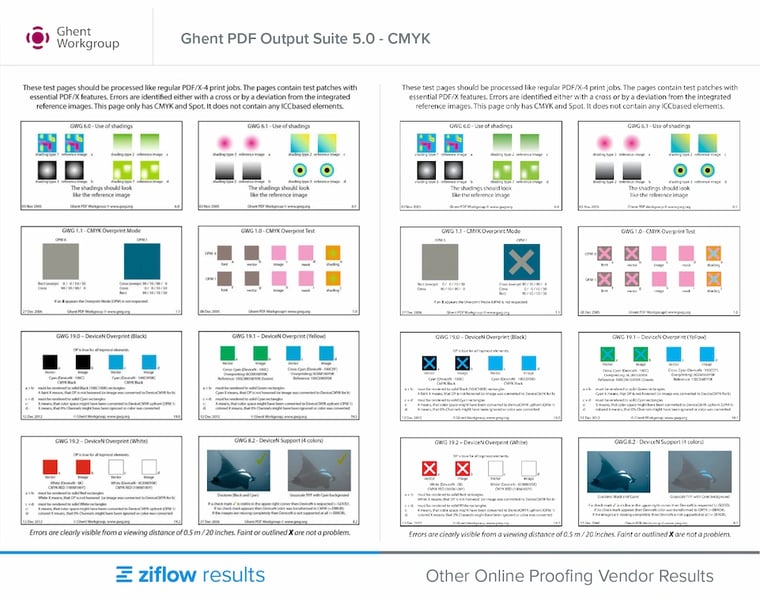
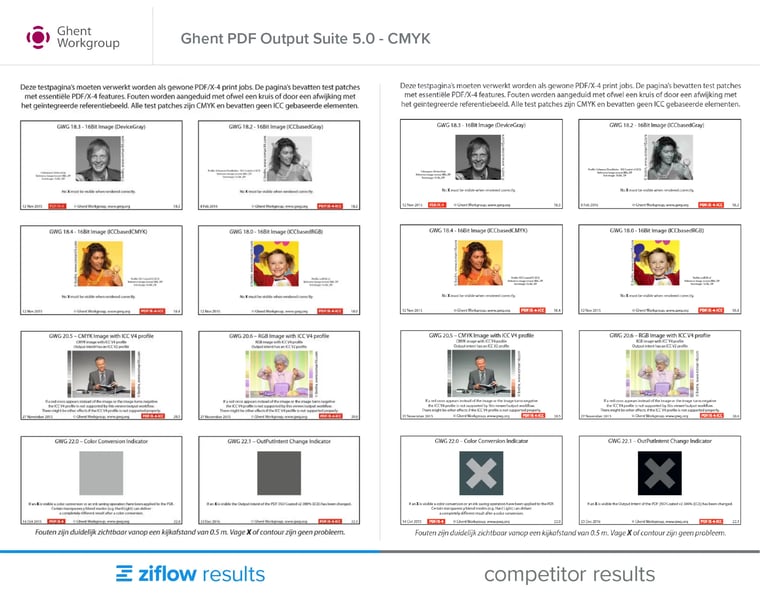
In all the screenshots, Ziflow is on the left and another unnamed proofing application is on the right. The Ghent PDF Output Suite 5.0 file will show X (crosses) where the processing is incompatible. In all of these tests, you'll notice that there are no X (crosses) at all in the Ziflow images, which means Ziflow processed it correctly.
Page 1 test: Overprinting. On this page, you'll notice a number of issues dealing with overprint on the non-Ziflow test.
Page 2 test: Transparency. This page tests transparency, an element used frequently in many designs.
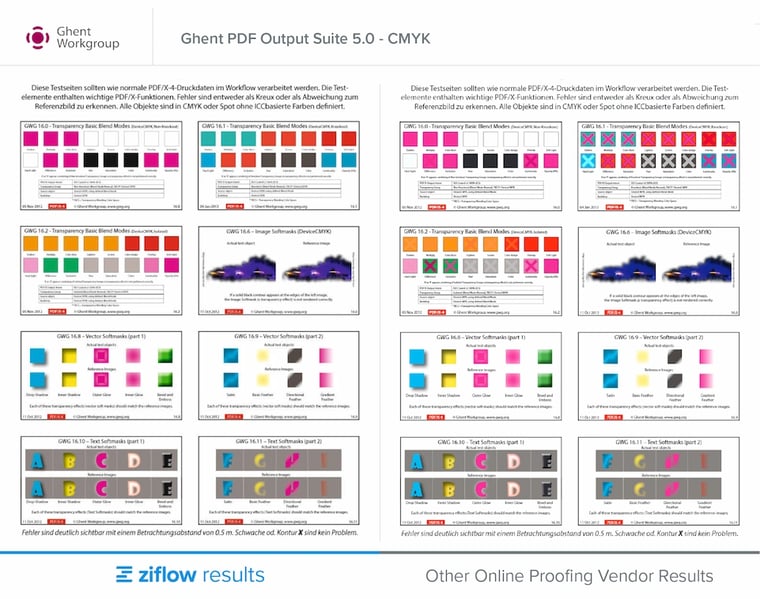
Page 3 test: Fonts. Most vendors handle fonts relatively well. But the one thing to note is the pixelation of text when zooming in. When compared to Ziflow, this vendor's text quality drops considerably even at 200%.
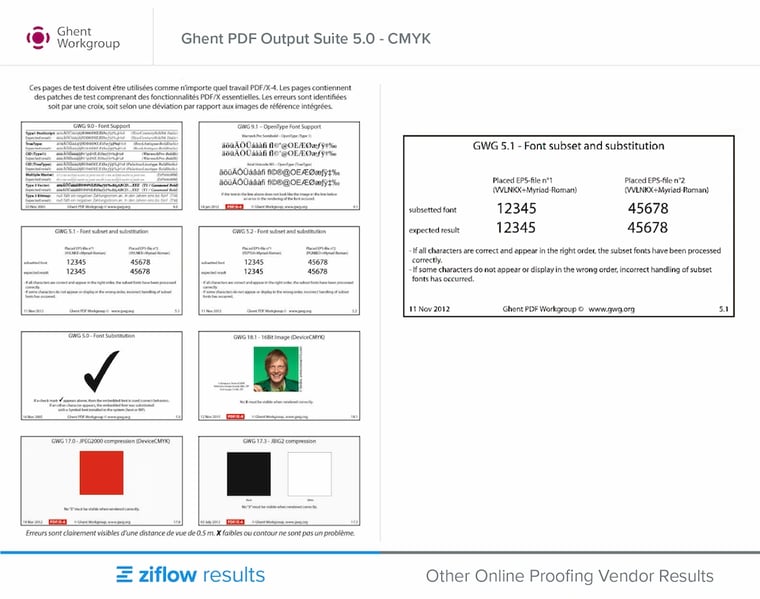
Page 4: Color reproduction. Probably one of the most important tests is color reproduction. Here we show how four vendors' results compare to Ziflow, and they all fail this test.
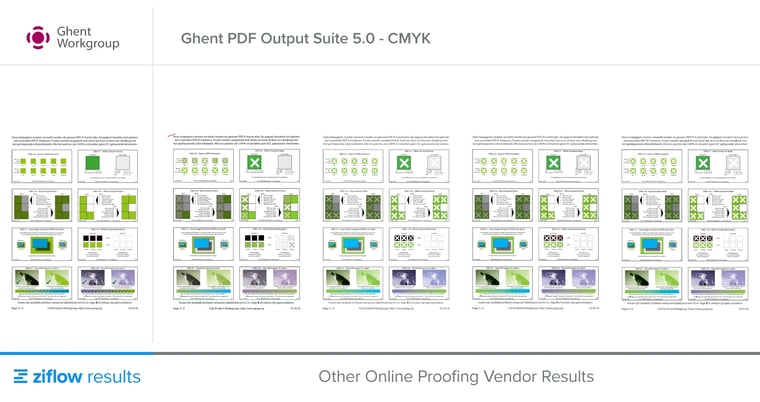
Page 5: Handling of ICC.
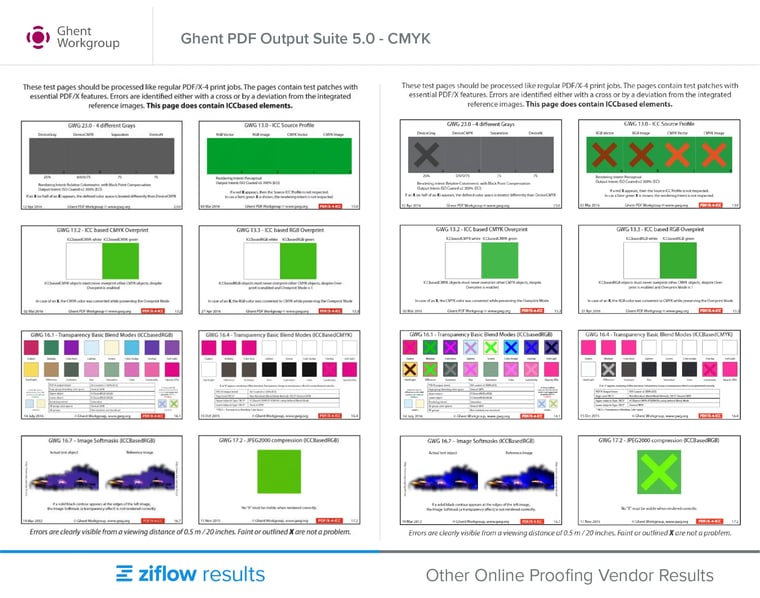
Page 6: Output intent change indicator. On this page, the last square "Output Intent Change Indicator" is technically quite difficult to get right. We've invested a considerable amount of time to get this right. All other vendors in this test failed.
ECI Altona Test Suite 2 results
ECI has conveniently created documentation that explains what the result should look like. In all the screenshots, Ziflow is on the left and another unnamed proofing application is on the right.
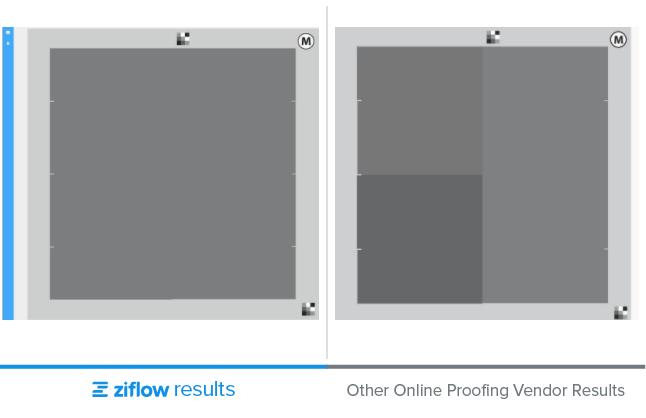
Patch B. A subtle diagonal line shows how the gray appears darker above the line. If this happens, transparency isn't handled correctly.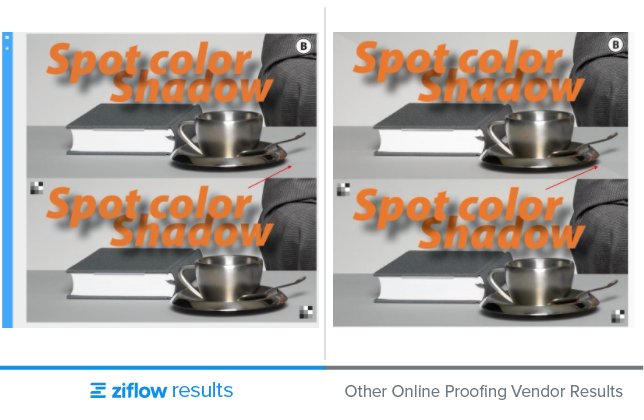
Patch C. This patch tests knockout within a transparency group. Apart from the poor quality of the conversion in our unnamed application, the knockout also shows clear gaps in color.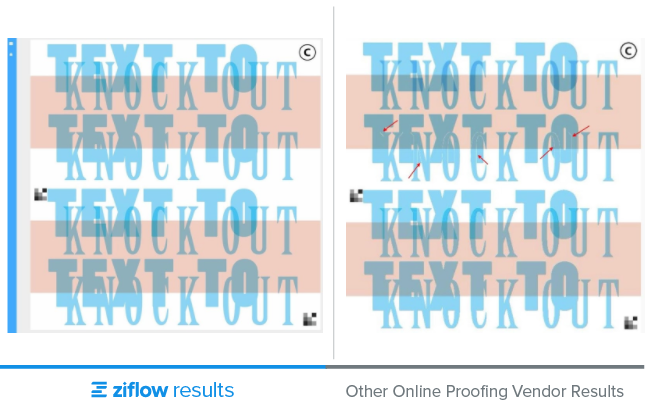
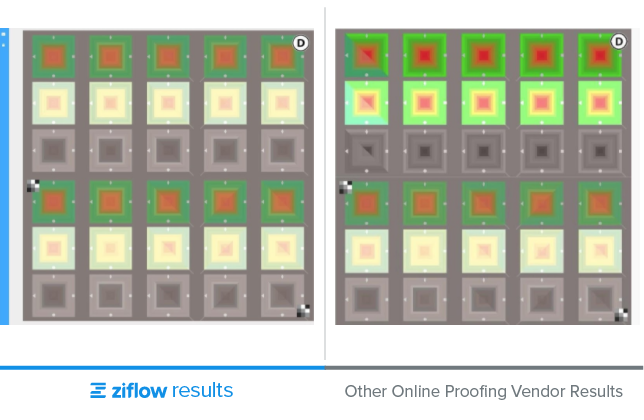
Patch D. The patch tests how a system deals with color management capabilities. In our unnamed vendor's application (on the right) the first three rows clearly show a lack of quality.
Expected output:
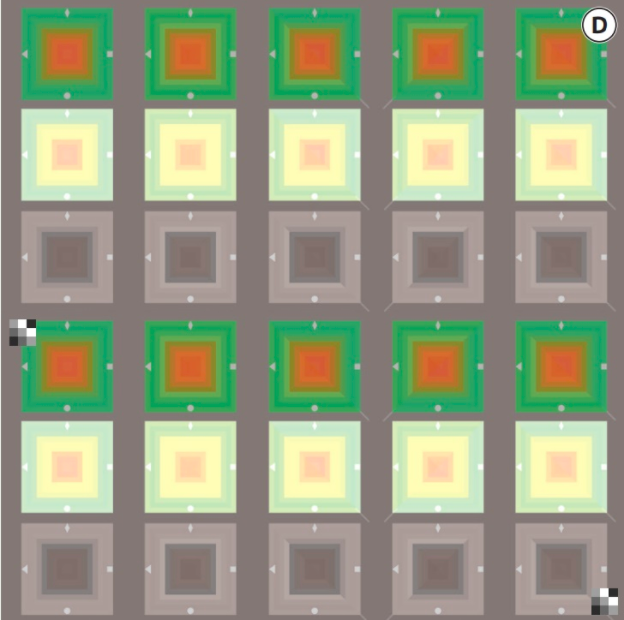
Results: In our unnamed vendor’s application (on the right) the first three rows clearly show a lack of quality.
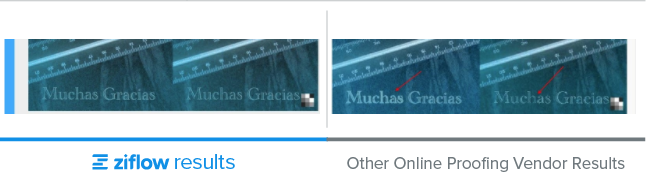
Patch F. Proper font handling is often a challenge during the conversion process. Here we show how our unnamed vendor fails to convert text that was converted to outlines in Photoshop and InDesign.
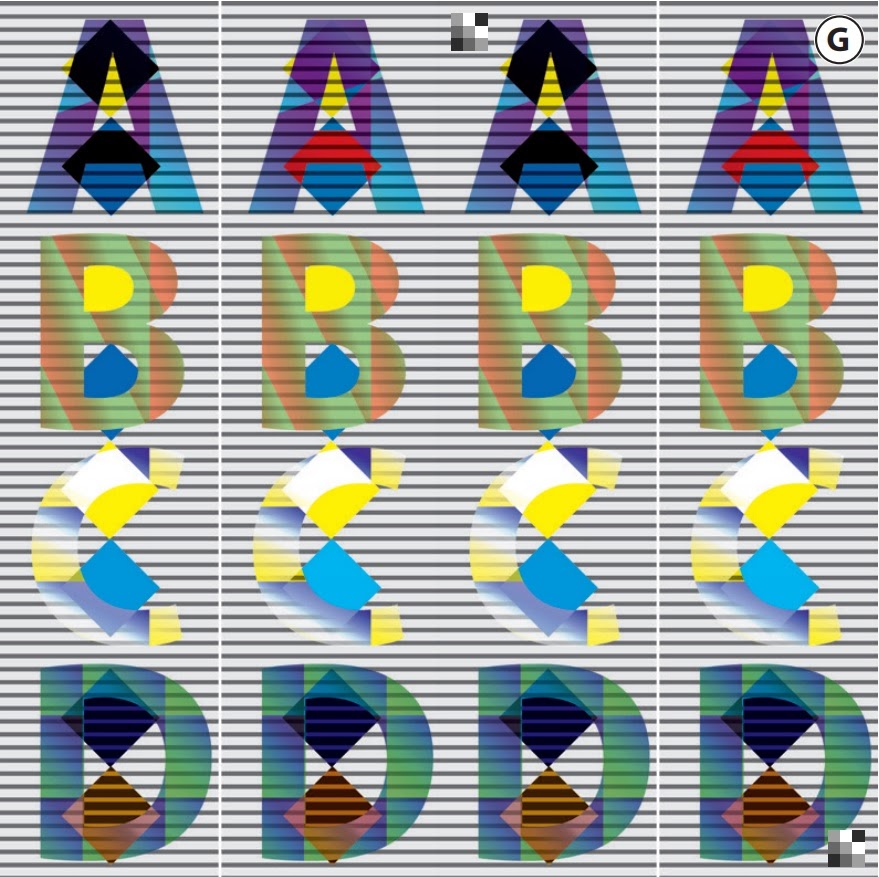
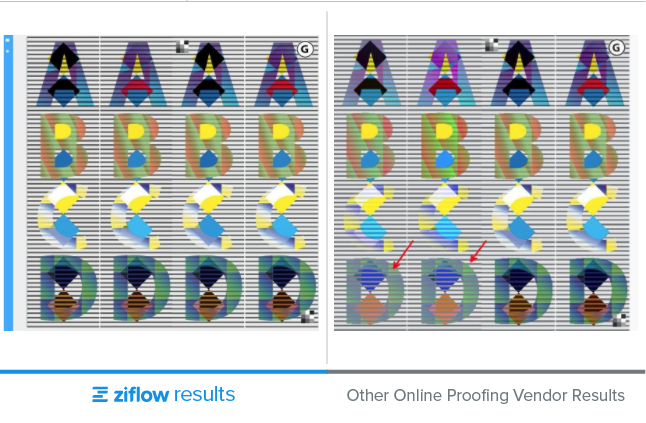
Patch G. The patch tests the use of various shading and transparency effects. Our unnamed vendor's result differs drastically from the expected result.
Expected output:
Results: Apart from every square being different in our unnamed vendor’s application, here I’d like to point out the most obvious ones.

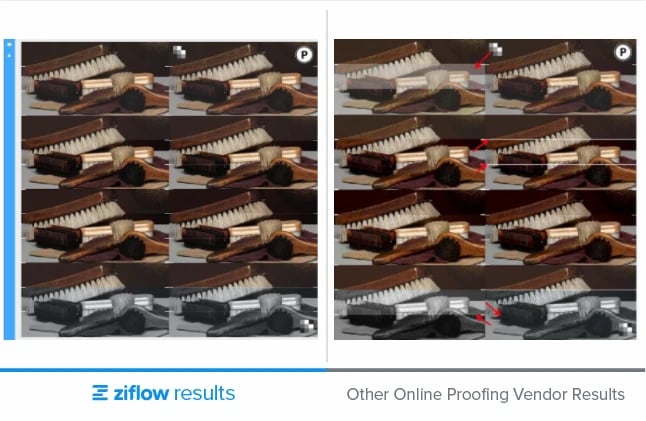
Patch M, P. Finally, patches M and P show a few other elements that can go wrong during conversion. Ziflow's resulting proof on the left is the correct one.
AI and automated PDF proofing
A big chunk of PDF proofing isn’t creative judgment at all, it’s checking. Is the legal disclaimer present? Is the logo the right one? Does every page match the checklist your team agreed on three campaigns ago? Necessary work, but nobody’s best work.
That’s the case for automation. Automated workflows already handle the routing: the proof moves from creative to brand to legal without anyone forwarding an email, and deadline reminders go out without anyone setting a calendar nudge. AI extends that same principle to the review itself.
With ReviewAI, Ziflow automatically checks a PDF proof against your pre-set checklist criteria and flags what passes and what doesn’t. Reviewers verify every AI suggestion before anything moves forward, so the machine handles the repetitive scanning and the humans handle the judgment calls: brand feel, visual accuracy, the things that just look wrong.
The result is speed and accuracy pulling in the same direction for once. Routine checks happen in seconds instead of eating a reviewer’s afternoon, fewer errors slip through to later rounds, and your reviewers spend their attention where it actually matters.
Why your PDF proofing software's processing quality matters
In these tests, you can see that other online proofing systems don't offer the same level of PDF processing accuracy and speed as Ziflow. The quality of color accuracy, text, transparency, and other properties can get drastically modified from an original PDF file when converting into a PDF proof for review.
Those discrepancies can have major implications for the review and approval process of PDFs. It not only provides reviewers with an inaccurate version of the PDF content, making it much harder to review, but it can create completely avoidable and costly print errors.
Automated workflows can help marketing teams gather feedback from multiple stakeholders efficiently, but those workflows are only as good as the underlying file processing. If your creative content doesn't render accurately, you're building your approval processes on a flawed foundation.
Take a free trial of Ziflow and test run your PDF files through our system today.

Before co-founding Ziflow, Anthony served as the co-founder and CTO of ProofHQ, a groundbreaking online proofing platform. His prior experience includes a role as Director of Product Management at Mtivity, where he developed a marketing process automation platform for agencies and brands.