If you're shopping for review and approval software, six tools lead the category: Ziflow, Filestage, PageProof, ReviewStudio, GoVisually, and Frame.io (plus Dropbox Replay as a bonus pick for video-first teams). The right fit depends on your team's size, the formats you produce, and how complex your approvals get. Ziflow is built for creative teams juggling high-volume, multi-format review cycles. Filestage suits mid-market teams that want simple, reliable approval flows. Smaller teams often reach for GoVisually and its lightweight proofing, while Frame.io specializes in video.
Here's why that choice matters. Most creative teams still run approvals through a patchwork of email, Slack and Teams messages, PDF comments, and shared folders. It's slow, feedback gets missed, and great work gets rushed at the worst possible moment. Review and approval software replaces that mess with one place to collect comments, track every version, and lock in sign-off, so you ship faster without losing control of quality.
Below, we break down what review and approval software actually does, the benefits for agencies and brands, the features that separate a real platform from a glorified comment box, and how all six tools compare on the use cases each one handles best. By the end, you'll know exactly which fits your team, no demo-call marathon required.
What we'll cover
Table of contents
- Benefits of review and approval software for agencies and brands
- Features to look for in review and approval software
- 6 powerful review and approval software for creative teams (+ bonus tool)
- Tips for choosing the best review and approval tool for your team
- Establish a robust review and approval process with Ziflow
- Review and approval software FAQs
Benefits of review and approval software for agencies and brands
Review and approval software helps automate the tedious (but important) manual elements of the feedback process, allowing your team to stay focused and productive. This is especially helpful for distributed teams and organizations with complex workflows.
However, the software is beneficial for more than its automation capabilities. Organizations that use approval software also enjoy:
Improved team collaboration
Review and approval software provides centralized communication for your team. Centralizing communication in one platform ensures no feedback or action items slip through the cracks.
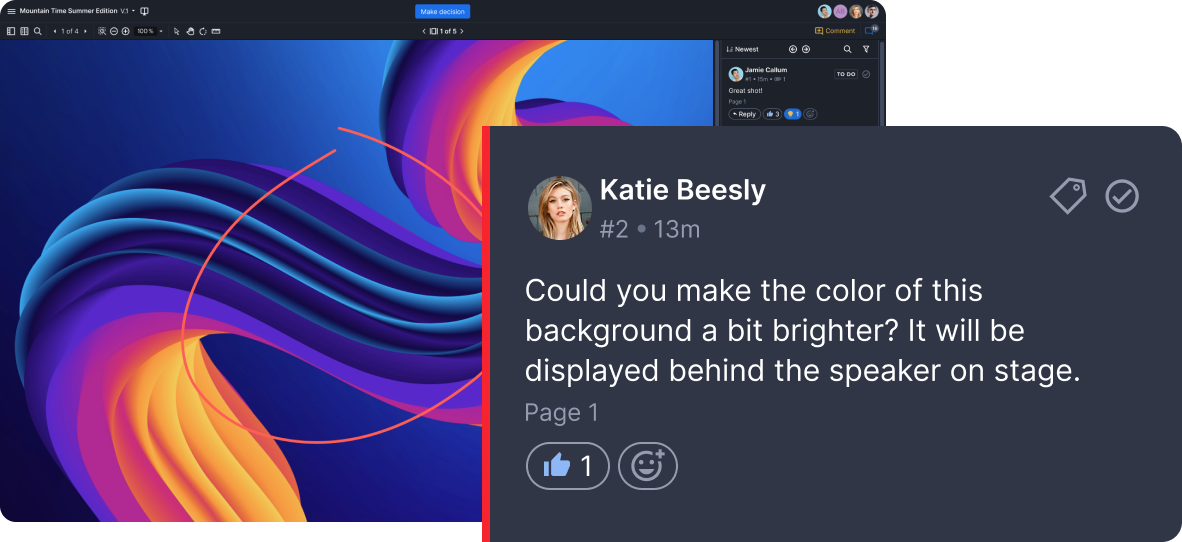
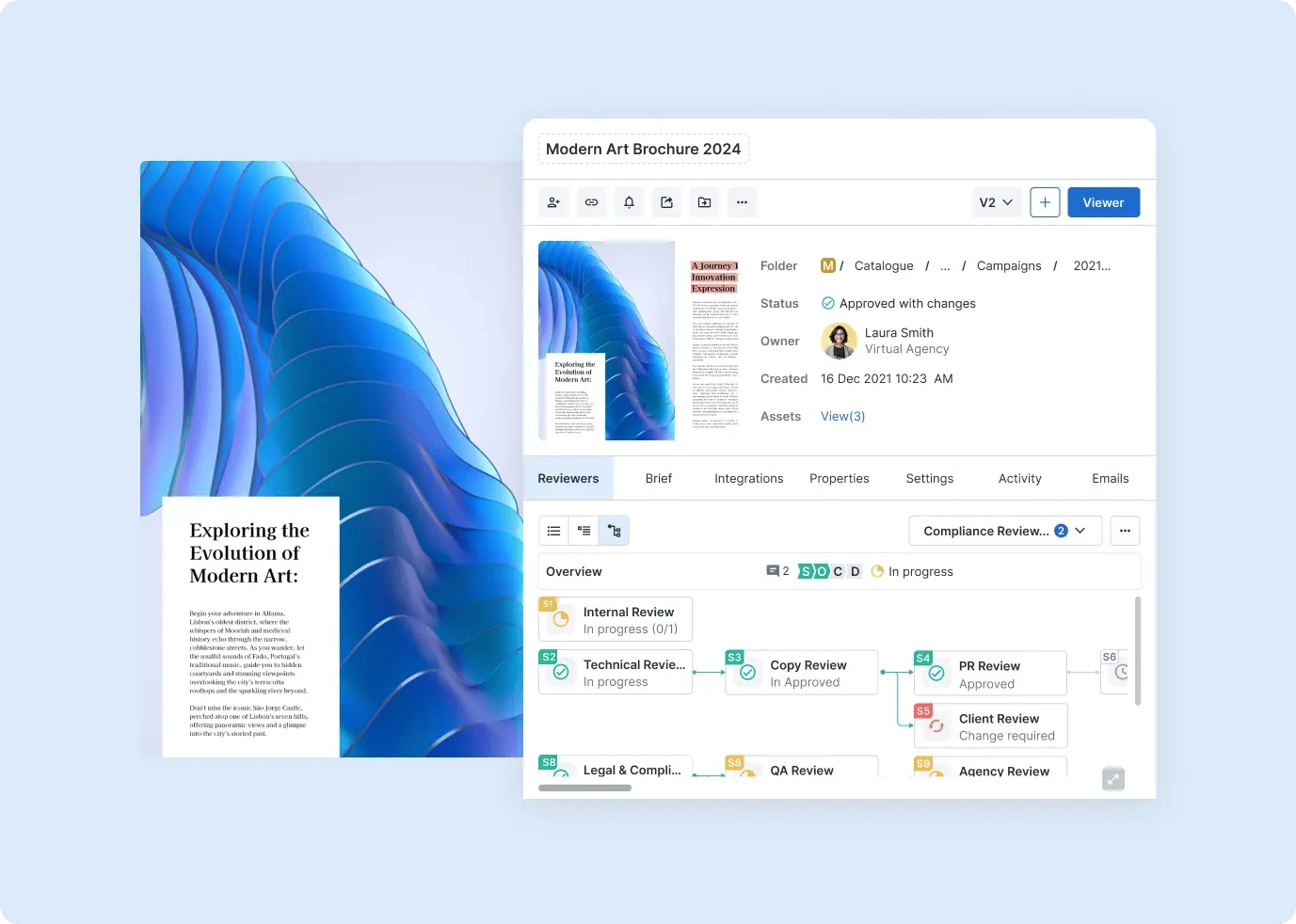
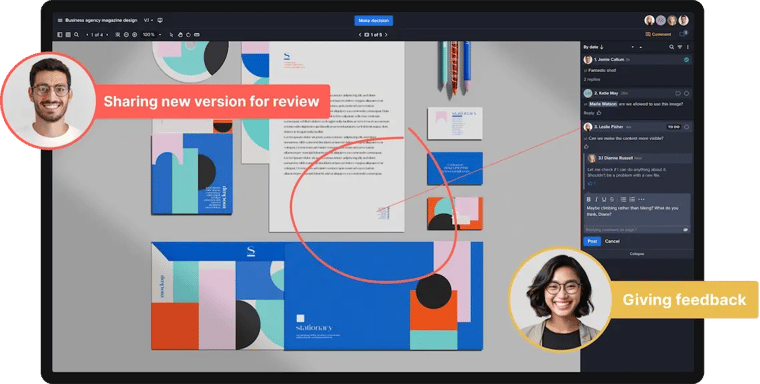
Ziflow users can collaborate directly on creative content with markup tools, and engage in real-time discussion threads that allow commenting, replies, file sharing and more.
With review and approval software, team members collaborate from anywhere in the world, tagging each other in comments and updating the status of files and projects — no emails, phone calls, or meetings needed. Everyone is on the same page, whether a team member is working from the company headquarters, a small local office, or their own home!
Faster, more accurate feedback
Intuitive comment and markup tools are a must for teams collaborating on creative projects. These features let reviewers provide clear, accurate feedback with a few keystrokes, pushing the entire project forward faster.
In a recent survey, 42% of marketing leaders said not getting feedback and comments from internal stakeholders in a timely fashion is the top cause of project delays.
But with review and approval software, you can easily avoid these project delays.
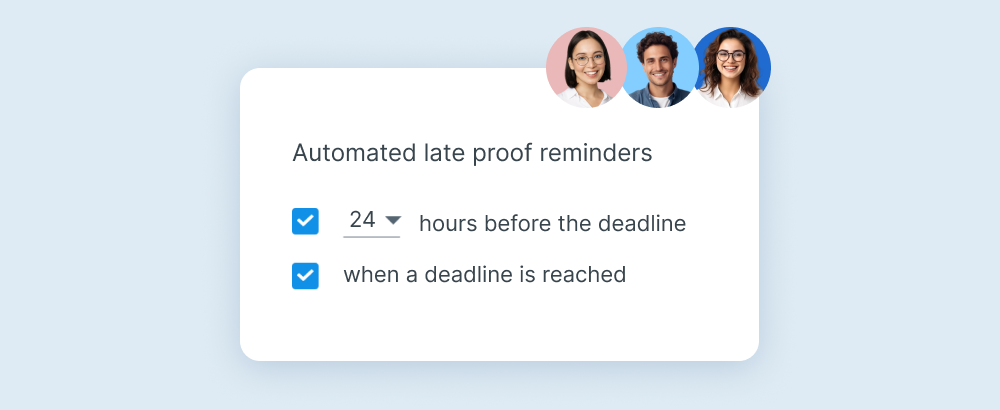
Automated notifications send alerts to clients and team members, and annotation tools allow stakeholders to provide specific, actionable feedback at every stage. This reduces misunderstandings and the number of revisions before moving on to the next step.
Fewer mistakes and less rework
Review and approval software reduces the amount of rework your team does by reducing miscommunication and making requests clearer. Projects don’t get stuck because one person forgot to give feedback, or missed a notification that content is ready for their review.
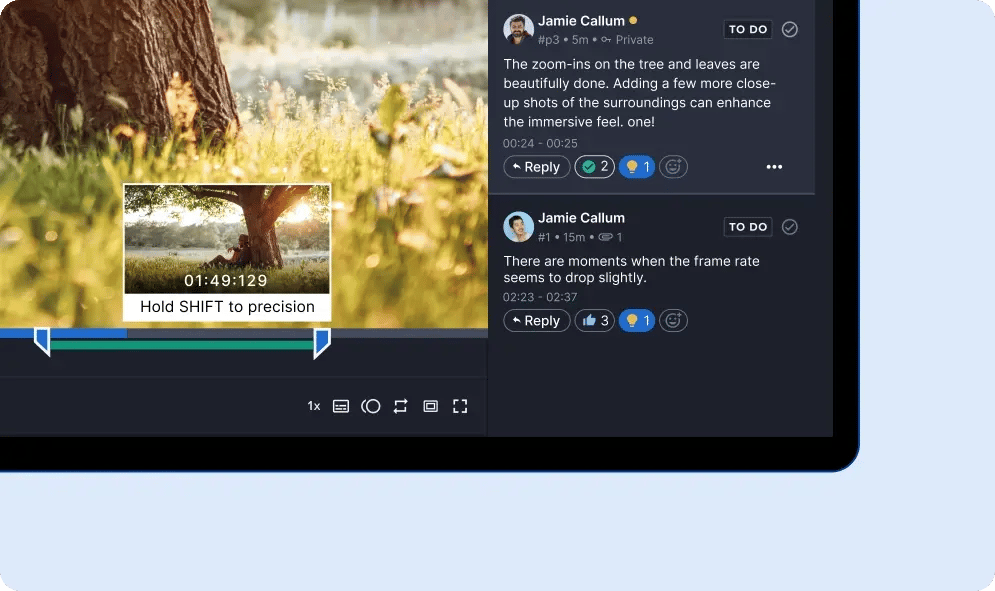
Feedback can be clearly labeled as actionable, and powerful comparison tools make it easy to compare current and previous versions of an asset to check that earlier feedback was incorporated. These features reduce errors that lead to delays, and centralized feedback means teams experience fewer mistakes and more productivity.
Streamlined review and approval
Most creative teams still rely on email to share content and request feedback – not an efficient way to work.
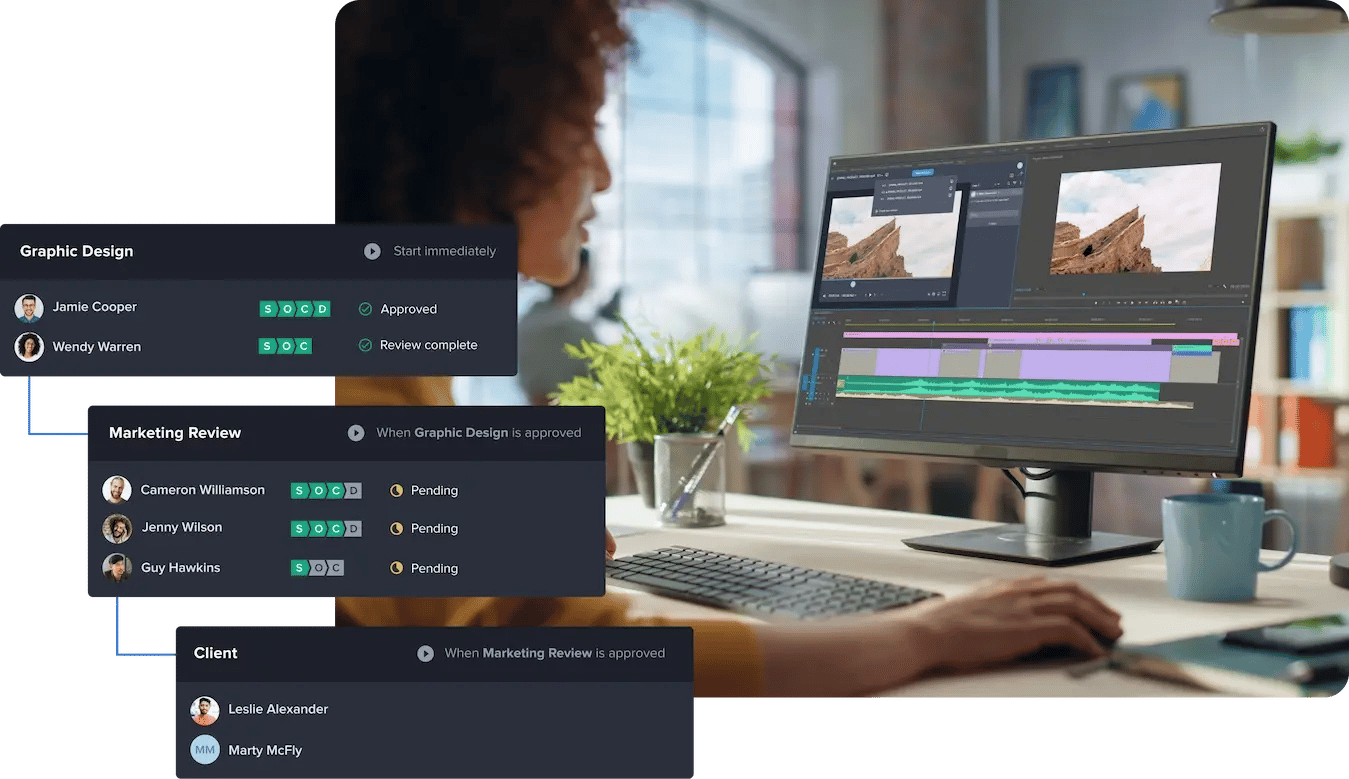
Review and approval software lets you streamline and automate the entire review and approval process in one centralized platform — no more lengthy email chains with multiple recipients and large file attachments. Workflow automation significantly reduces project turnaround timelines for even the most complex campaigns and projects.
Higher-quality content
Improved collaboration and better feedback help improve the quality of creative content. For example, when teams create assets that contain text, images, branded colors, and other page elements, multiple layers of review and approval occur before finalizing the piece. These additional review layers contribute to a stronger deliverable, ensuring that it meets all stakeholder requests and brand standards.
Improved client communication and trust
A solid client relationship is built on one thing: trust. Nothing breaks down trust faster than poor communication between a creative team and clients. Proof approval software enhances communication, improves clarity, and builds trust. Clients appreciate increased transparency and accountability, and you know that satisfaction leads to long-term partnerships and referrals.
Faster project completion
When you don’t have to spend time chasing down feedback or waiting on clarification, projects can move forward more quickly. Projects that use top-rated creative approval software like Ziflow, need, on average, only two versions to complete — compared to four to six versions to completion without a formal approval software or process in place.

Reduced compliance risks
Review and approval software plays an important role in reducing compliance risks for organizations, including marketing and brand compliance risks. Some legal compliance requirements relate to industry standards, like accessibility standards or ethical guidelines. Others relate to intellectual property law or contract law.
For example, email introduces security threats. Sharing content or project details over email is risky and may not meet regulatory and legal compliance requirements in certain industries.
Features to look for in review and approval software
Not all review and approval software applications are the same. There are a wide range of features to consider for your business. Understanding the basic functionality and the more advanced options can help you make the best choice for your team.
User experience
Nobody wants to use a clunky app. Choose software with an intuitive and user-friendly interface that is enjoyable to use. Clear navigation makes the user journey painless. The ease of learning for both internal team members and external clients is also important. Consider factors such as responsiveness, ease of access, and overall satisfaction with the platform.
Multi-asset support
Multi-asset support in approval software allows the program to handle and facilitate the approval process for a wide range of assets or content types. Many creative teams work on diverse projects that involve many types of files and media, including video files, audio files, GIFs, images, static file formats, and rich media. Multi-asset support ensures that the platform is versatile enough to accommodate and manage these different file types.
Whether you’re editing a video montage or creating mockups for web design, multi-asset support is a must.
Ziflow’s approval software supports 1,200+ different media types.
Real-time collaboration and feedback management
The inclusion of collaborative tools, like tagging, real-time chats, and notifications, makes sure internal teams can communicate efficiently, reducing the likelihood of miscommunication and simplifying project workflows.
These features are key for enhancing communication with team members, external stakeholders, and clients. They add context, allow for more detailed and precise feedback, and encourage back-and-forth in a productive way without adding roadblocks.
Version control and comparison
Version control and comparison provide a structured framework for accountability while managing multiple iterations of a project. With the ability to access past versions, teams consistently work on the most up-to-date and approved file, minimizing the risk of errors.
Seeing the version history helps track the evolution of files, showing time stamps for changes, the individuals responsible, and the approvals associated with each version. This not only fosters transparency, but also establishes a reliable audit trail — essential for accountability, compliance, and maintaining the project's integrity over time.
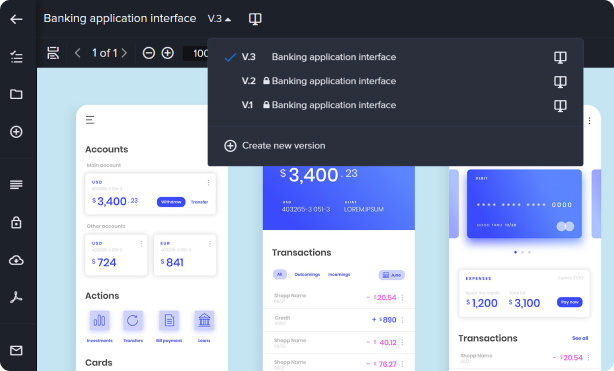
An administrator has locked access to versions 1 and 2 of this asset in Ziflow.
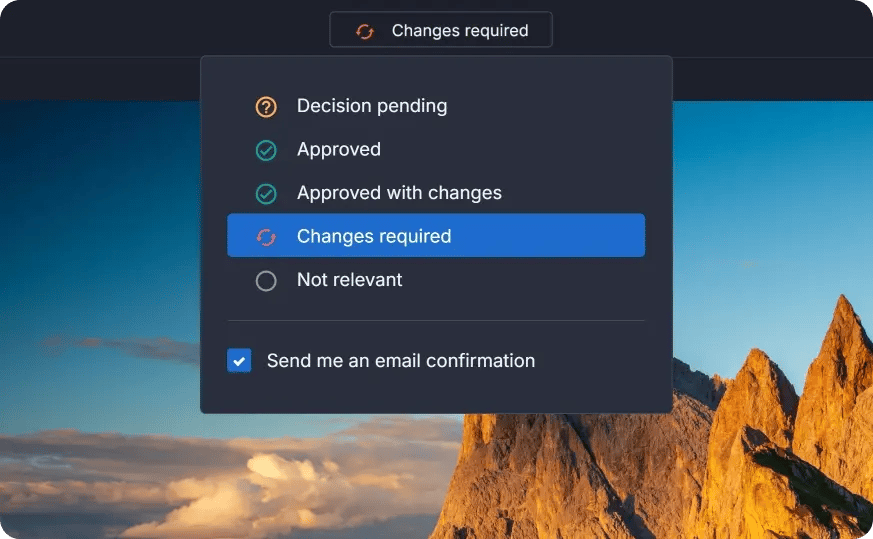
Automated approval workflows and approval status
Automated workflows and approval status tracking are indispensable features in approval software. Over 30% of businesses report at least one completely automated function — and with review and approval software, you can streamline even more processes through automation!
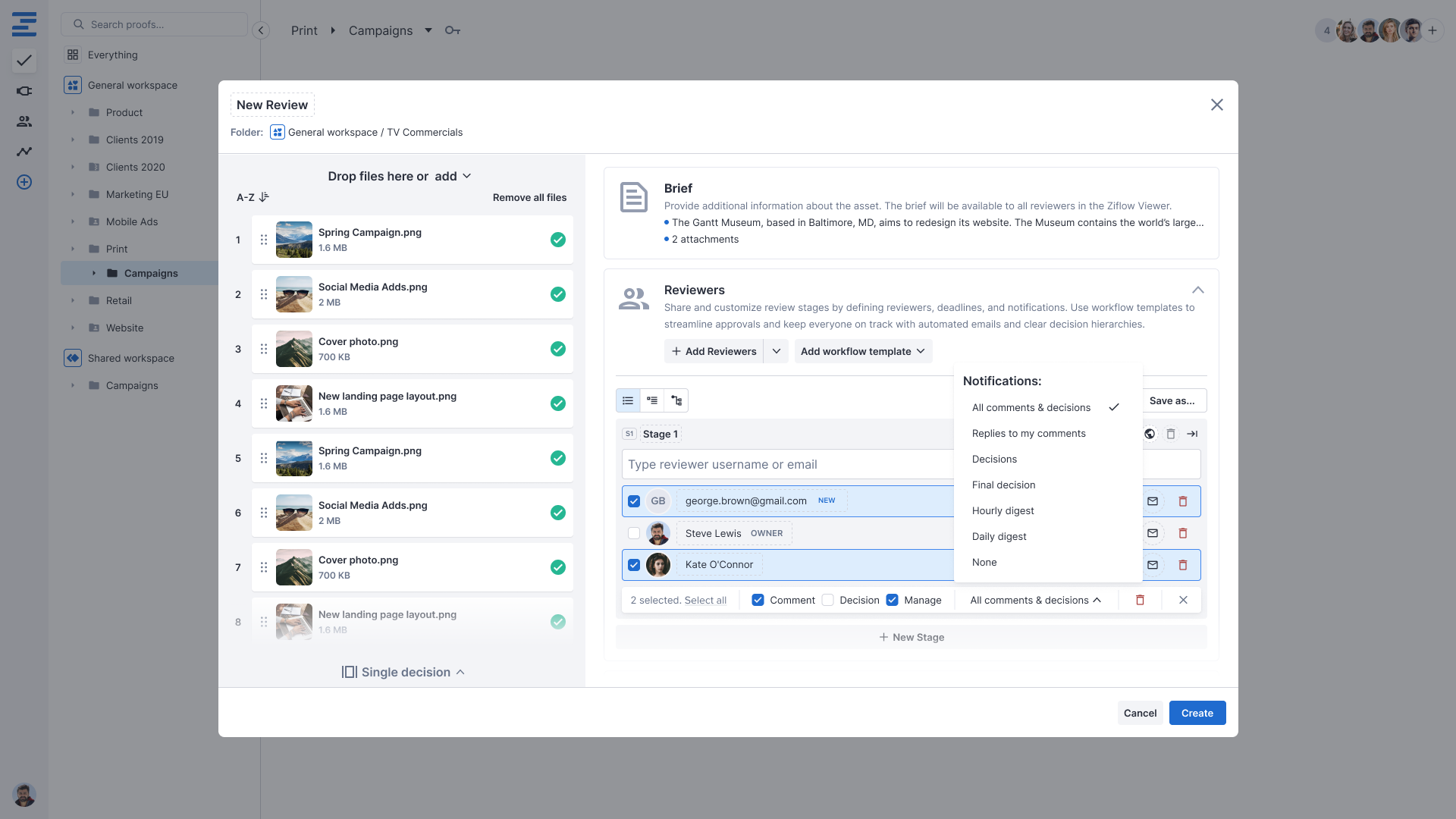
Automation helps promote smooth handoffs between teams or stakeholders and ensures consistency from project to project. Customizing these automations means that your review and approval process matches the needs of both your creative team and your clients regardless of project-specific requirements.
The real-time visibility into the status of approvals and requested changes promotes accountability. Clients, stakeholders, and internal teams can easily track progress, making informed decisions to keep timelines on track. The automated workflows and status tracking contribute to a more efficient, accountable, and well-coordinated approval process.
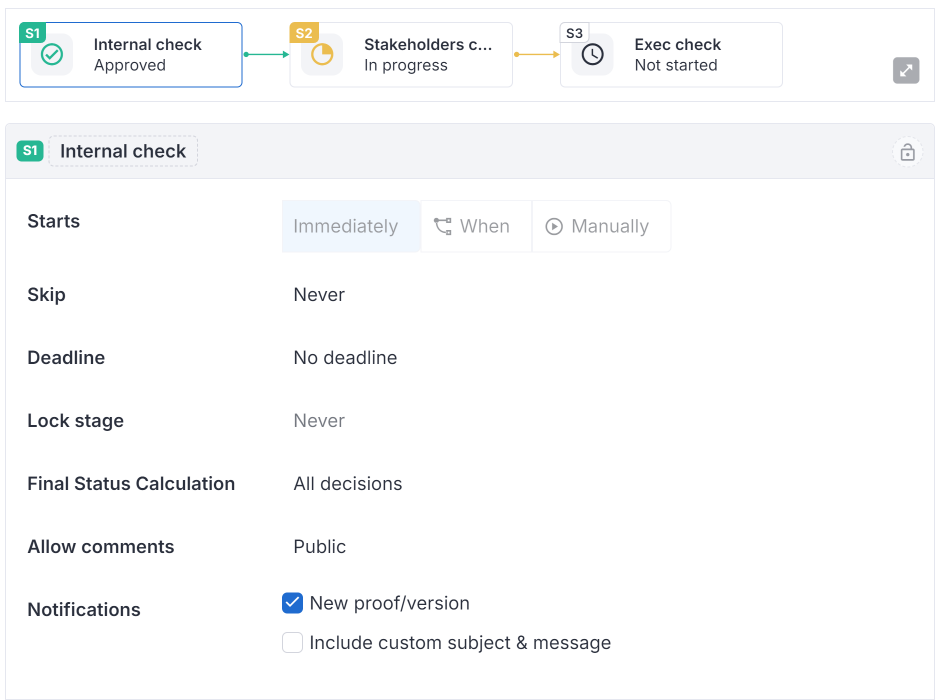
Ziflow’s workflow automation features let users specify actions that trigger notifications for assignees.
Scalability to the largest, highest-output teams
Only review and approval software with high scalability supports the largest, highest-output creative teams. A few important scalability features include multi-account support, audit trails, and batch reviews.
Multi-account support allows large teams to manage multiple projects concurrently without compromising efficiency. Comprehensive audit trails are critical for maintaining accountability and transparency, with the ability to trace every action, approval, or modification. Batch reviews, where teams can review multiple items simultaneously, improve the efficiency of high-output teams by expediting the approval process without sacrificing accuracy.
Enterprise-grade security and permissions
When you’re storing confidential information in the cloud, you want some assurance of file protection. Approval software should include features like data encryption on file transfer, and SOC 1-, SOC 2-, and ISO 27001-certified hosting. The ability to set custom permissions for users and files further enhances security.
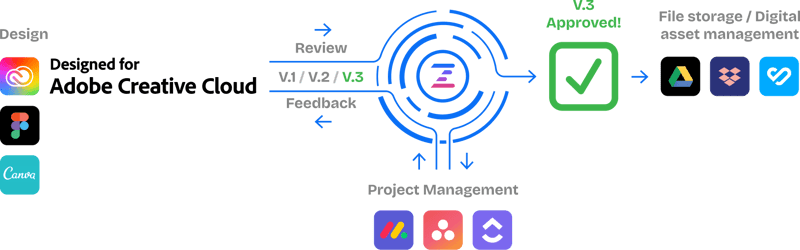
Integrations with existing design, video, and project management tools
Review and approval software should seamlessly integrate with other platforms and the existing tech stack, including design, video, and project management tools. This prevents your team from losing valuable time toggling between platforms and ensures an interconnected workflow. These features allow team members to focus on creative tasks instead of struggling with different interfaces or moving information from tool to tool.
6 powerful review and approval software for creative teams (+ bonus tool)
| Tool | Best for | G2 rating | Pricing (from) | Free trial |
|---|---|---|---|---|
| Ziflow | Enterprise and mid-market creative teams with complex, multi-stage approval workflows | 4.5/5 (935) | Free plan; paid from $199/mo* | Yes |
| Filestage | Mid-market marketing teams that want simple, structured review rounds | 4.6/5 (242) | Free plan; paid from $199/mo | Yes (30 days) |
| PageProof | Brand and agency teams that need secure, integration-heavy proofing | 4.8/5 (387) | From $249/mo (Team) | Yes (on request) |
| ReviewStudio | Small-to-midsize creative teams and freelancers wanting affordable per-user proofing | 157 reviews (rating: confirm) | Free plan; Pro from $15/user/mo | Yes (30 days) |
| GoVisually | Small teams and client-facing creatives wanting the lightest, fastest proofing | 4.4/5 (67) | From $9/mo (Solo) | Yes (7 days) |
| Frame.io | Video and post-production teams and Adobe Creative Cloud users | 4.5/5 (191) | Free plan; Pro from $15/member/mo | Yes |
| Dropbox Replay (bonus) | Existing Dropbox teams doing frame-accurate video and audio review | No standalone profile | Add-on to paid Dropbox plans | Yes (Dropbox) |
*Ziflow Standard, billed annually; Enterprise is custom. Ratings and review counts via G2/Capterra, June 2026. Pricing as published on each vendor's site.
Figuring out which review and approval software is best for your team may seem daunting. But once you know which features and capabilities are important for your projects and workflow, you can begin narrowing down your options.
Let’s examine the features and functionalities of the top six powerful review and approval software for creative teams.
1. Ziflow
Best for: Enterprise and mid-market creative teams with complex, multi-stage approval workflows.
Ratings: G2 4.5/5 (935 reviews) | Capterra 4.8/5 (417 reviews)
Pricing: Free "Personal" plan (2 users); Standard from $199/mo (billed annually); Pro $329/mo; Enterprise custom. Free trial: Yes.
Ziflow stands out as a comprehensive review and approval software designed to streamline and elevate your creative operations.
Ziflow's intuitive interface, powerful collaboration features, and robust integration capabilities make it a go-to choice for creative teams. Its focus on automation, real-time feedback, and version control contributes to a more efficient and transparent creative workflow.
Key features and benefits
- Automated workflows: Fully automate a variety of manual tasks in your workflow to keep the creative pipeline moving.
- Integrations: Ziflow seamlessly integrates with popular project management tools as well as graphic design tools, reducing the need for constant platform switching.
- Real-time collaboration: Team members can provide feedback, annotations, and edits directly on assets in real time.
- Version management: Teams can track changes, ensuring everyone is working on the latest version of any creative asset.
- Proofing capabilities: Feedback is easy with markup tools, annotations, and threaded discussions.
- Audit trails: Get a comprehensive record of the approval process, enhancing accountability and supporting compliance requirements.
- Checklists: Attach a customizable, reusable set of pass/fail criteria to any proof so reviewers know exactly what to check and feedback stays consistent and objective every time.
- ReviewAI: Ziflow's AI proofing tool automatically evaluates each checklist item and returns a pass/fail recommendation with rationale and suggested fixes that reviewers confirm or override in seconds, keeping humans in control (Enterprise add-on).
2. Filestage
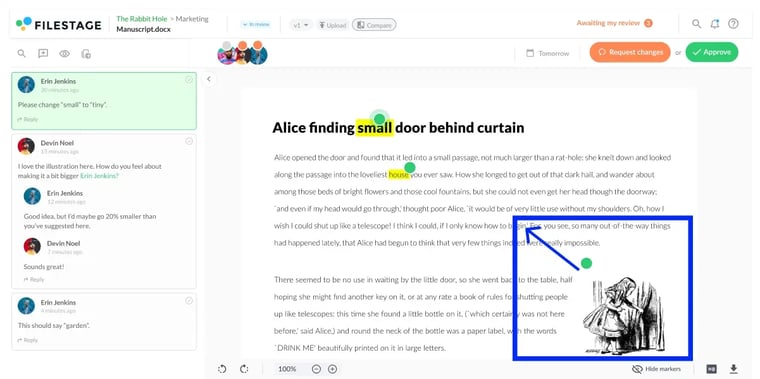
Best for: Mid-market marketing teams that want simple, structured review rounds without a learning curve.
Ratings: G2 4.6/5 (242 reviews) | Capterra 4.7/5 (102 reviews)
Pricing: Free plan; Starter $199/mo; Business $329/mo; Enterprise custom. Free trial: Yes, 30 days.
Filestage is designed to simplify the review and approval process, making it a viable option for creative teams seeking efficiency. With a focus on user-friendly functionalities, Filestage offers several features that contribute to its effectiveness in project management.
Key features and benefits
- Project dashboard: Filestage has a user-friendly interface, making it accessible for team members with varying levels of technical expertise.
- Markup and annotation tools: Team members can use the annotation and proofing features to provide comments and feedback on assets.
- Version comparisons: Teams can compare two versions of a file side by side to see differences.
- Customizable projects: Teams may create custom projects for each type of review process.
3. PageProof
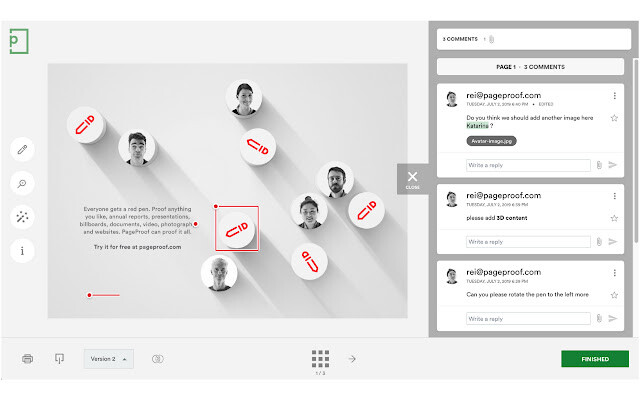
Best for: Brand and agency teams that need secure, integration-heavy proofing with tight version control.
Ratings: G2 4.8/5 (387 reviews) | Capterra 4.8/5 (51 reviews)
Pricing: Team $249/mo ($2,499/yr, up to ~10 users); Team Plus $399/mo; Enterprise custom. No free plan. Free trial: Yes, on request.
PageProof is a tool that emphasizes precision and efficiency in workflows. Like other review and approval software, PageProof keeps your team out of email and focused on completing the next project phase.
Key features and benefits
- Customer support: PageProof assists teams with setting up the platform and adding integrations.
- User-friendly design: The simple interface makes getting your team up to speed quick and easy.
- Broad file support: From static files to HTML banners to design prototypes, broad file support makes proofing simpler — even with tricky file types.
- Partner integrations: PageProof integrates with a variety of partner platforms with no code needed.
4. ReviewStudio
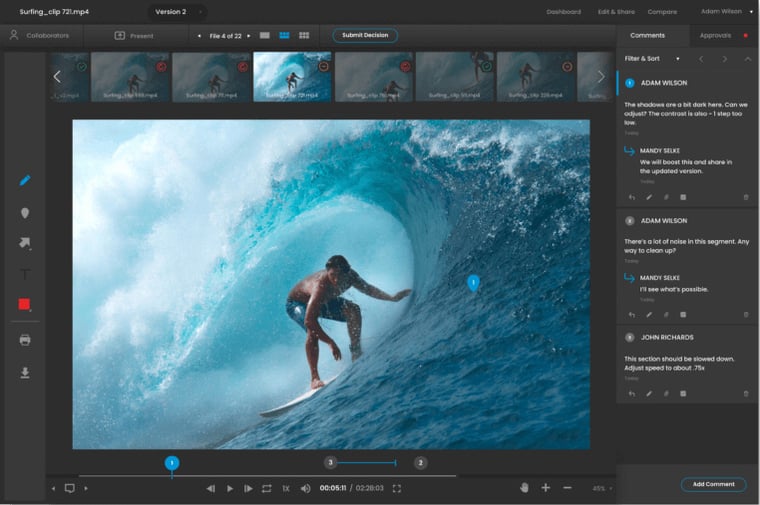
Best for: Small-to-midsize creative teams and freelancers that want affordable, per-user proofing.
Ratings: G2 157 reviews (star value to confirm) | Capterra 4.8/5 (37 reviews)
Pricing: Free "Starter" plan; Pro $15/user/mo ($12 annual); Enterprise custom. Free trial: Yes, 30 days.
ReviewStudio focuses on visual collaboration. Customers appreciate the client-facing functionality, customer support, and the ease of getting started.
Key features and benefits
- Easy to use: The review, markup, and feedback settings in ReviewStudio are flexible and user-friendly.
- Feedback options: ReviewStudio has multiple settings for leaving project feedback, including public, private, and live feedback.
- Task management settings: The task management settings allow team members to create new tasks from feedback.
- Functional approvals: The approval settings include the ability to assign approvers for projects and set approval deadlines.
5. GoVisually
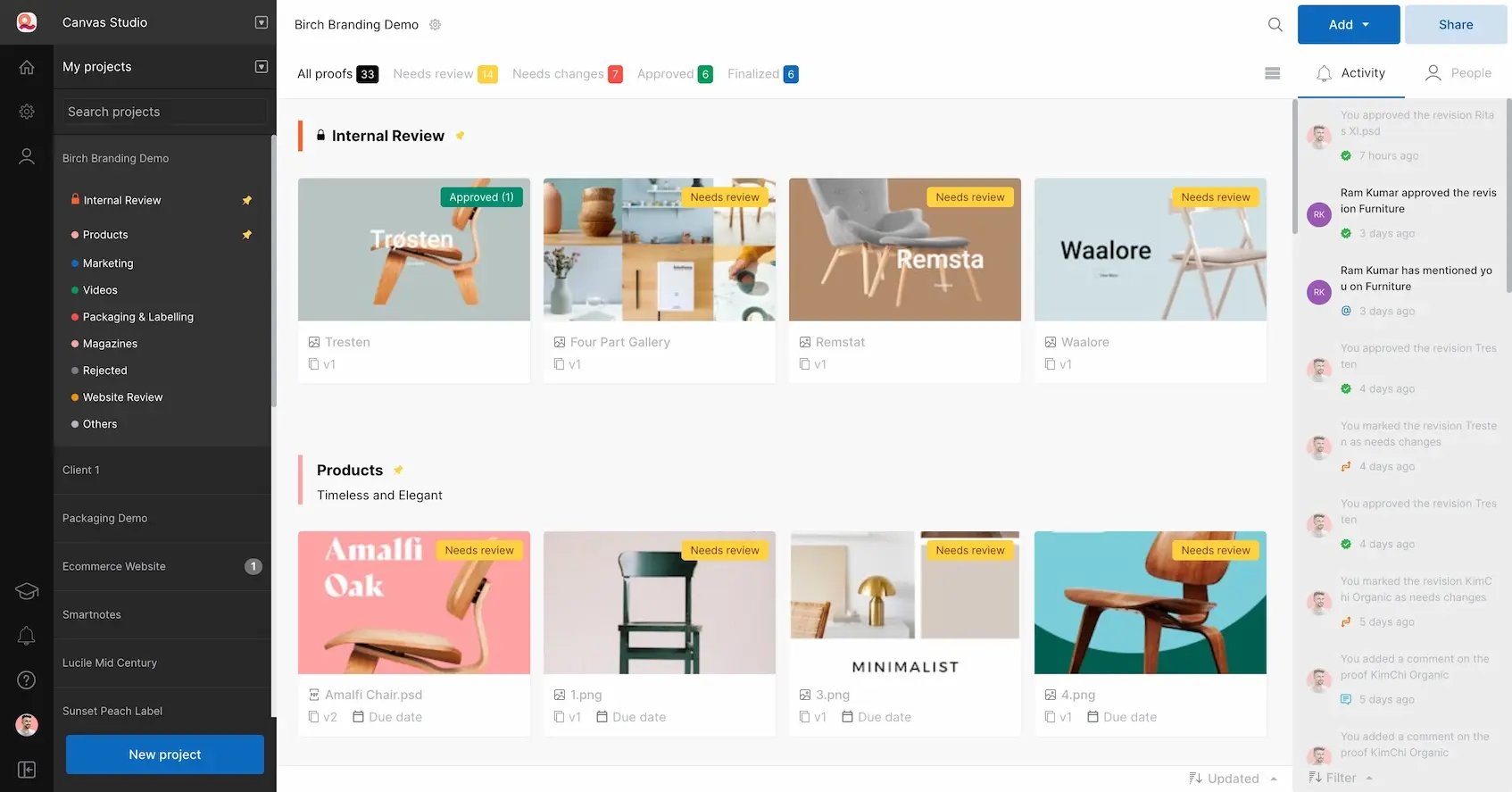
GoVisually
Best for: Small teams and client-facing creatives that want the fastest, lightest proofing with no reviewer logins.
Ratings: G2 4.4/5 (67 reviews) | Capterra 4.4/5 (63 reviews)
Pricing: Solo $9/mo; Lite $49/mo; Pro $99/mo; Enterprise custom. Free trial: Yes, 7 days (no card).
GoVisually is a simplified proofing solution that allows teams to share, review, and approve visual projects, including designs, videos, and PDFs.
Key features and benefits
- Client reviews: A shareable link to review designs makes it quick and easy to send to clients and external stakeholders.
- File load time: GoVisually prioritizes load time for images, PDFs, and video, ensuring large files and slow connections don’t hold up your team.
- Integration with Adobe Creative Cloud: This feature is great for a team that produces the majority of projects in Adobe programs.
6. Frame.io
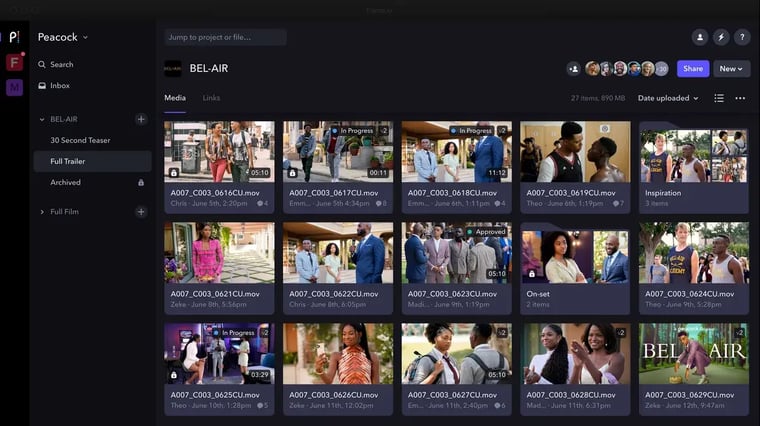
Best for: Video and post-production teams, and Adobe Creative Cloud users, that need frame-accurate review.
Ratings: G2 4.5/5 (191 reviews) | Capterra 4.6/5 (80 reviews)
Pricing: Free plan; Pro $15/member/mo; Team $25/member/mo; Enterprise custom. Free trial: Yes.
Frame.io's specialization in video-centric collaboration works well for creative teams engaged in video production. It's tailored to meet the distinctive needs of video-centric workflows.
Key features and benefits
- Specializes in video: Frame.io provides a dedicated space for teams to review, comment, and collaborate on video content.
- Symbols: The platform allows team members to use emojis, mentions, and hashtags, with the ability to search hashtags.
- Customizable presentations: Once your project is client-ready, Frame.io allows you to create custom presentations for clients.
Bonus: Dropbox Replay
Bonus: Dropbox Replay
Best for: Existing Dropbox teams that need frame-accurate video and audio review inside Dropbox.
Ratings: No standalone G2 or Capterra profile (feedback rolls up under Dropbox).
Pricing: Available on paid Dropbox plans; Replay Add-On (about $10 to $15/user/mo) unlocks advanced features; limited free use. Free trial: Yes, via Dropbox.
While it’s not technically a review and approval tool, Dropbox is a cloud-based file storage and collaboration platform that allows users to store and share files online.
For review and approval, teams can use the Dropbox Replay tool, which offers browser-based reviews through a unique link and editing tools like markups and comments. While this can be useful for reviewing projects, it's not nearly as robust as other solutions. If a company is already heavily invested in Dropbox, the Replay tool can be an affordable option.
Key features and benefits
- File synchronization: Team members can access files from any device, and Dropbox supports collaboration through shared folders, file links, and editing features.
- Live review sessions: Teams can review and comment on an audio or video as it plays in real time.
- Version control: By saving each version of projects, teams can reference changes made at any phase.
Tips for choosing the best review and approval tool for your team
Navigating the landscape of review and approval software needs a thoughtful and strategic approach.
Plan for the unique creative environment of your team. Consider whether your audience is internal or external, the diversity of campaigns, the types of content, and any compliance requirements. Then, map out the processes and workflows needed to meet these demands. Once these steps are out of the way, you can choose the right tools to support your team.
Remember: Effective team management and a strong feedback culture help deliver successful projects!
Establish a robust review and approval process with Ziflow
The complexities of the project review and approval process highlight the need to pick the right tool for your team.
The features that elevate approval software allow for seamless collaboration, automation, and integration capabilities.
Ziflow allows your team to streamline the most complex approval workflows, facilitating real-time feedback and providing robust version control. The Ziflow proofing platform meets and exceeds the demands of diverse creative environments, with a user-friendly interface and integration with essential tools.
An efficient review and approval process is a powerful tool, and Ziflow offers a dynamic, flexible solution to improve your workflow. Sign up today to get started and watch your creative workflows transform.
Review and approval software FAQs
What is review and approval software?
Review and approval software is a centralized platform for managing the review and approval of creative assets: every comment, discussion, and decision, across every version of every asset in a campaign. Instead of chasing feedback through email, Slack, and shared folders, teams collect markups, track versions, and capture sign-off in one place. That single source of truth is what keeps creative moving without version chaos or missed feedback.
What are the benefits of review and approval software?
The main benefits are faster and more accurate feedback, fewer mistakes and less rework, streamlined and automated approval workflows, higher-quality on-brand content, stronger client trust, and reduced compliance risk. Centralizing every comment and action item means nothing slips through the cracks, even across distributed teams. In practice, teams using dedicated software often need only two versions to finish a project, compared with four to six when they rely on email and shared folders.
What features should you look for in review and approval software?
Prioritize an intuitive interface, support for many file and media types, real-time collaboration with precise markup tools, version control with side-by-side comparison, and automated workflows with approval status tracking. For larger teams, enterprise-grade security, granular permissions, and scalability are essential. Finally, make sure it integrates with the design, video, and project management tools your team already uses.
Is review and approval software the same as a DAM or project management tool?
No. Project management tools track tasks and deadlines, and digital asset management (DAM) systems store finished, approved files. Review and approval software governs everything in between: the structured cycle of marking up, revising, and approving creative before it ships. Teams that try to force reviews through a PM tool or email usually end up with the same version confusion the software is designed to eliminate.
Who needs review and approval software?
Any team producing creative at volume, including in-house marketing teams, creative and advertising agencies, and video production teams. It is especially valuable in regulated industries like healthcare, financial services, and pharma, where audit trails and documented approvals are non-negotiable. As a rule of thumb, if more than a few people review a piece of creative before launch, dedicated software quickly pays for itself.
How do you choose the best review and approval software?
Start with your team's creative environment: whether reviewers are internal or external, how varied your campaigns and content types are, and any compliance requirements you need to meet. Map the workflows you actually need, then match them against each tool's automation, file support, security, and integrations. Most vendors offer a free trial, so shortlist two or three and test them on a real review cycle before you commit.

With a track record that spans media giants like WarnerMedia, Viacom, and Google, Aaron's expertise shines through in multi-million dollar projects across various mediums, from traditional television to the dynamic realm of YouTube.