
This release of Ziflow Online Proofing includes additions to our automated workflow capabilities, as well as new benefits in the area of proof viewing and administration. Keep reading to learn more about how we've once again simplified the review and approval process.
Today's release is largely centered on increasing the flexibility of how your users will interact with proofs. Here's a quick snapshot of what became available today.
Workflow Template Permissions
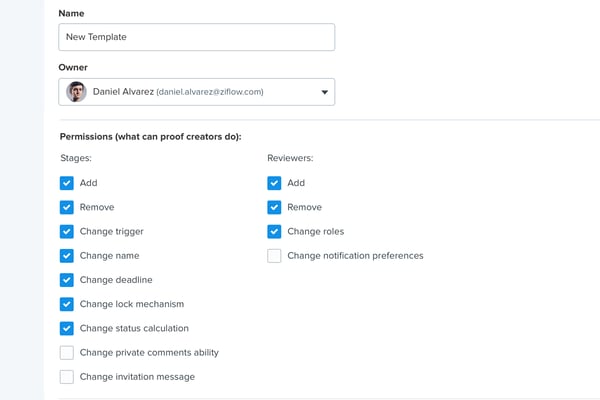
Ziflow now provides administrators with more granular control over their workflow templates when used by proof creators. Previously proof owners could make any change on a proof when using a workflow template, but now administrators can decide what elements of the workflow can be edited on a proof.
Additional Proof Defaults
As with our last several releases, we continue to enable the toggling of proof setting at the account level. As we add in new capabilities every few weeks, we continue to ensure a level of simplicity in how your users will engage with Ziflow. For this release, we've also expanded the global settings for proofing defaults.
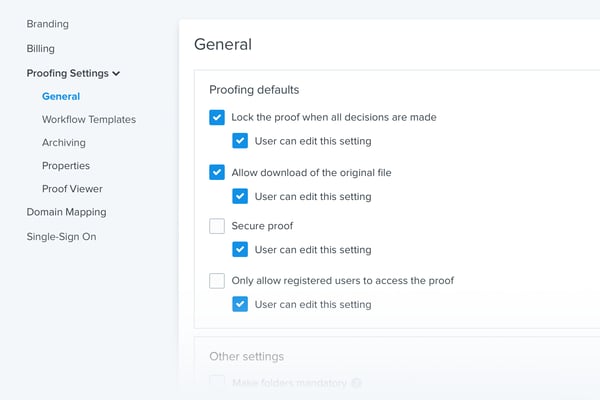
Now account administrators can check certain settings by default and disable these from being changed by proof creators.
In addition to these new additions, the following new capabilities have been released today:
- We've added a setting to manage which roles will be allowed to delete comments. This is especially useful for teams that have compliance requirements which dictate the saving of all review and approval activities.
- The proof status is now calculated based only on stages that are currently, or were at one point, active and therefore ignoring inactive stages.
- New stage and proof settings to suppress proof creation and invitation emails.
- Settings for a default role to be granted when adding a new reviewer to a proof.
If you’re a Ziflow customer, or on a trial account, these new features are available now (note: some new features do require an Enterprise Edition subscription).
If you haven’t already, you can request a free trial by clicking through below.

Prior to his role at Ziflow, Mike led ProofHQ's marketing team to a triumphant exit through its acquisition by Workfront.